

Whether you are a start-up or a large enterprise, many organisations are currently working on digitising and optimising their document processes. Before topics such as AI and automation can take centre stage, some companies still need to replace their paper archives. To do this effectively, it is essential to create a file plan, as a solid and well-structured foundation is required.
For organisations at the beginning of their digital transformation, digital files offer the perfect starting point. Despite all the new technological terminology, the concept of a file plan remains as relevant as ever.
To create a digital file plan and make the most of it, several key questions must be addressed: Which documents should be stored in which files? Into which categories should these documents be organised? Who is permitted to view and edit them? What properties should the documents have?
In this article, we guide you through the process of answering all of these questions. One helpful reference remains constant throughout: the traditional physical folder.
Definition: What Is a File Plan?
A file plan (also referred to as a process map, records schedule, registry plan, archive plan or folder structure) is a tool used to organise and manage all records within an organisation in a systematic and consistent way. It covers all files, data and documents and defines the overarching structure in which these records are arranged. This structure includes files and their internal organisation, and it contains subject-related or thematic information objects that fall outside the organisation’s core processes.
Whether a file plan is used privately, within a company or in public administration, it provides a content-based framework, for example by themes, tasks or organisational units. This framework helps users to create new files and to locate existing ones, regardless of whether the records are held in analogue or digital form. A file plan also ensures that hybrid record collections, which may consist partly of paper documents and partly of digital files or database content, remain coherent and manageable.
Why a File Plan Is Worth It – An Overview of the Benefits
- A foundation for digital transformation: For organisations that are still at the beginning of their journey, digital files and a structured file plan provide the ideal starting point for digitalisation and the introduction of a document management system (DMS).
- Structured document storage: As a content framework, the file plan supports effective file management, regardless of whether documents are held in analogue or digital form.
- Time and effort savings in document filing: In a digital archive, manual document assignment is no longer required. The system handles this automatically.
- Familiar structures: Existing organisational structures can be mapped within the file plan, helping users to orient themselves quickly and continue working in a familiar way.
- Faster access to information: Thanks to the systematic and transparent structure of a file plan, information and documents can be found far more efficiently, improving knowledge management in the long term.
- Managing hybrid records: A file plan enables organisations to capture and maintain the context of both paper-based and digital documents, whether they are stored as files or in databases.
- Efficient data storage: Because a file plan represents the hierarchical structure of the filing system using intelligent links, documents can be associated with several files without being duplicated.
Creating a File Plan: Digital Organisation with Structure
To ensure that the right information can always be found within the files, organisations need to create file plans, also known as process maps. This applies to physical folders and digital file systems alike, and it remains just as important when working with the digital archive of a DMS. What does change, however, is the workload involved. The laborious manual assignment of documents according to the file plan is no longer necessary. With digital document archiving, this process happens automatically. Within the file plan, specific criteria are defined that allow documents to be automatically assigned to the correct digital files.
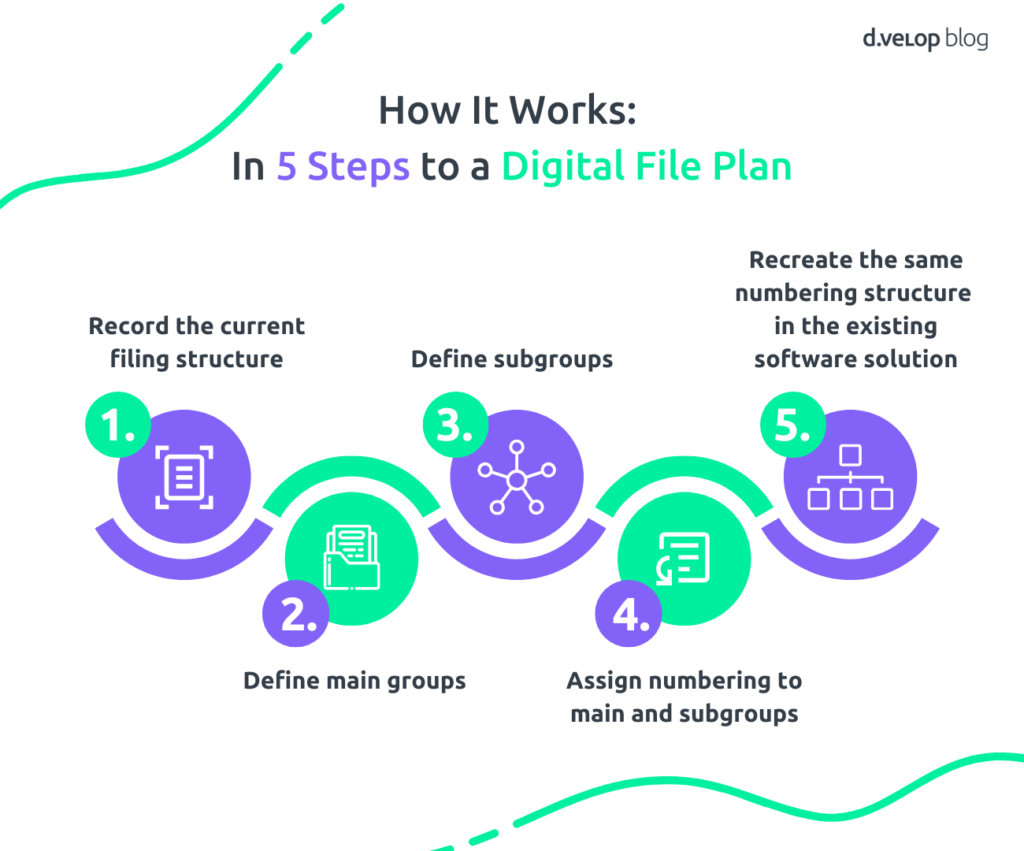
The Path to a File Plan – 5 Simple Steps
To successfully create a digital file plan, the first step is to review the current filing structure and identify areas with potential for improvement. You then define meaningful main groups and subgroups and map this structure within your software solution. In summary, five straightforward steps are required to create a digital file plan:
- Record the current filing structure
- Define main groups
- Define subgroups
- Assign numbering to main and subgroups
- Recreate the same numbering structure in the existing software solution
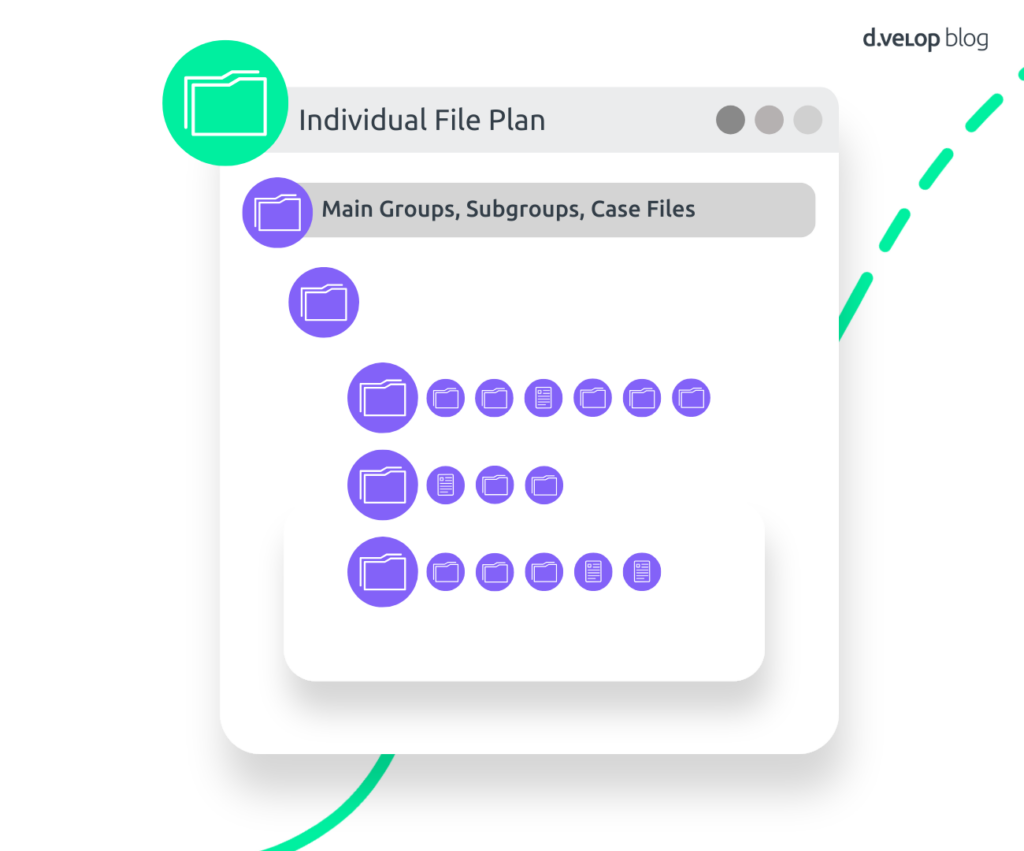
The File Plan and Its Individual Structure
Digital files, much like traditional paper files, bring together documents and records that belong to the same subject area. As a result, a document may appear in several files. The major advantage is that a document can be linked to multiple files without physically existing more than once. There is no need for reproduction or constant copying. A file plan therefore provides a continuous overview of all related information.
How Is a File Plan Structured?
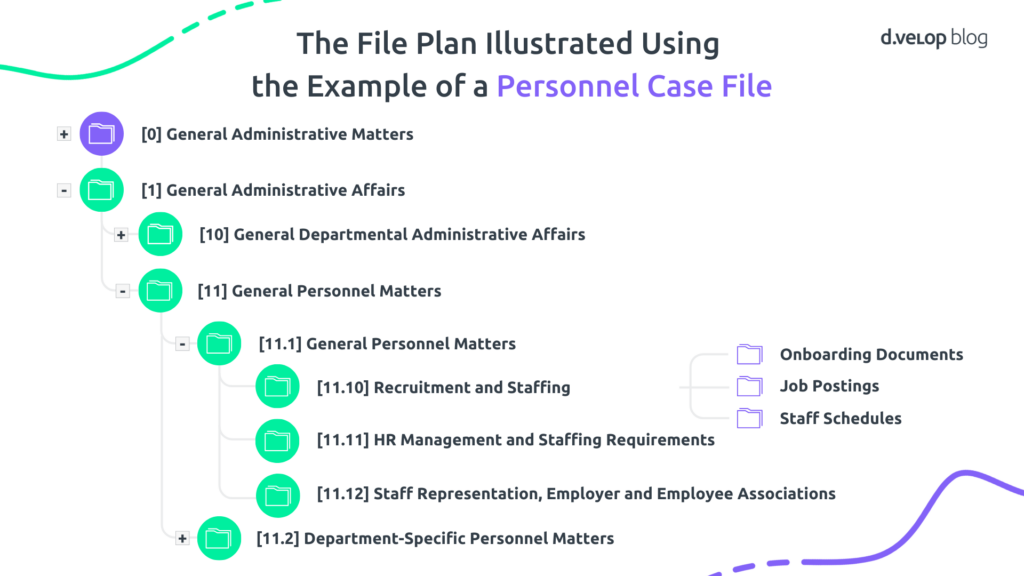
A file plan is based on the tasks, themes or processes of an organisation. Files are arranged hierarchically in main groups and subgroups, each with a systematic numbering structure. This classification creates thematic categories that are associated with specific types of files, such as case files for topics like onboarding, job postings or staff scheduling. These files contain the relevant documents and information.
An example of such a structure in the area of personnel matters could look like this:A file plan is based on the tasks, themes or processes of an organisation. Files are arranged hierarchically in main groups and subgroups, each with a systematic numbering structure. This classification creates thematic categories that are associated with specific types of files, such as case files for topics like onboarding, job postings or staff scheduling. These files contain the relevant documents and information.
An example of such a structure in the area of personnel matters could look like this:
Successful Implementation: Moving Towards Digitalisation with a File Plan
These two local authorities are already benefiting from a clear overview of their documents:
- The City of Wuppertal is advancing its digital transformation and now works entirely with an electronic file plan based on the d.velop documents document management system.
- The Municipality of Ascheberg is also implementing digital files across the entire organisation and benefits from more efficient process management, made possible by the introduction of a digital file plan.
Unlock New Potential: Creating Intelligent Digital File Plans with AI
To fully unlock the efficiency potential of digital file plans, artificial intelligence (AI) opens up exciting new possibilities. One conceivable scenario is that AI could, in the long term, support the creation of a file plan. An administrator would simply provide a written description stating that a file structure is needed for a procurement file with specific categories and properties.
This description could then be entered as a prompt into a chat-based AI. The AI would generate a concrete structural proposal without the need for any manual configuration, as is currently required.
Integrating File Plans into Existing Processes
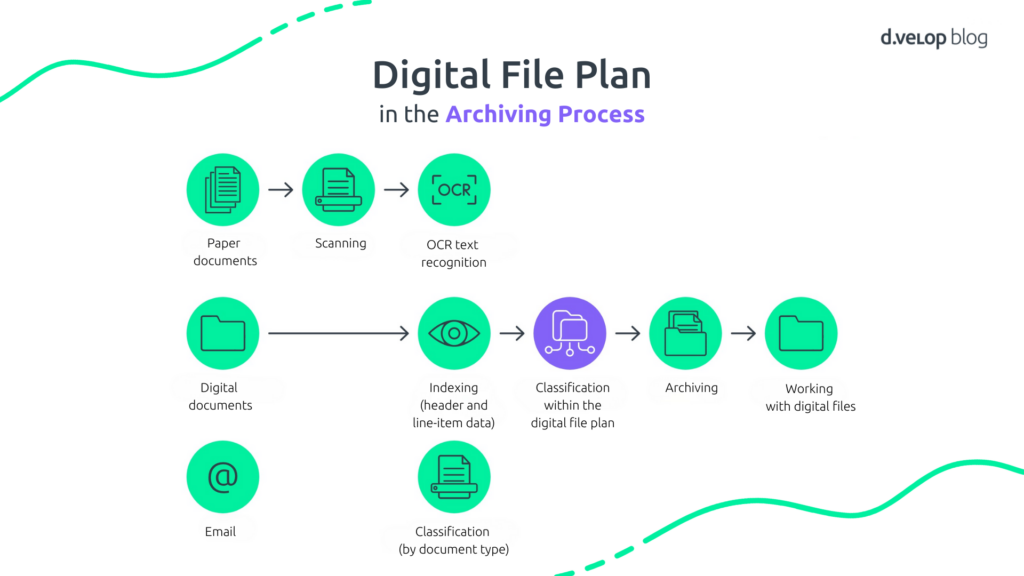
Creating file plans is one thing, but integrating them effectively into existing organisational processes is another. File plans are a central component in the workflow from scanning through to audit-proof archiving and form an essential part of overall document management.
Excursus: AI Is Already Being Used in the Archiving Process
Artificial intelligence is already playing a role in document processing workflows. It supports the entire document lifecycle within organisations in a digital and automated manner. The technology behind this is Intelligent Document Processing (IDP), which enables the automatic capture, conversion and processing of data and documents.
Using artificial intelligence (AI), machine learning (ML) and natural language processing (NLP), specific information can be extracted and analysed from a wide range of documents. After import—via scanning, email or upload—the AI takes over the analysis and processing by separating documents, classifying them and extracting the relevant data. The documents are then stored automatically in the document management system and integrated into existing workflows of the process management software.
This intelligent document processing enables:
- Reduced manual effort through automation
- Accurate processing thanks to intelligent recognition and analysis
- Relief for teams, allowing them to focus on strategic tasks
- Extensibility through the integration of additional AI providers for further capabilities
IDP therefore covers all processes that take place after a document is received. In some cases, the properties identified through IDP can even trigger an automatic assignment to a file. This does, however, require the file plan to have been configured in advance by administrators.
Avoiding Confusion: How a File Plan Differs from a File Structure
Definition: What Is a File Structure?
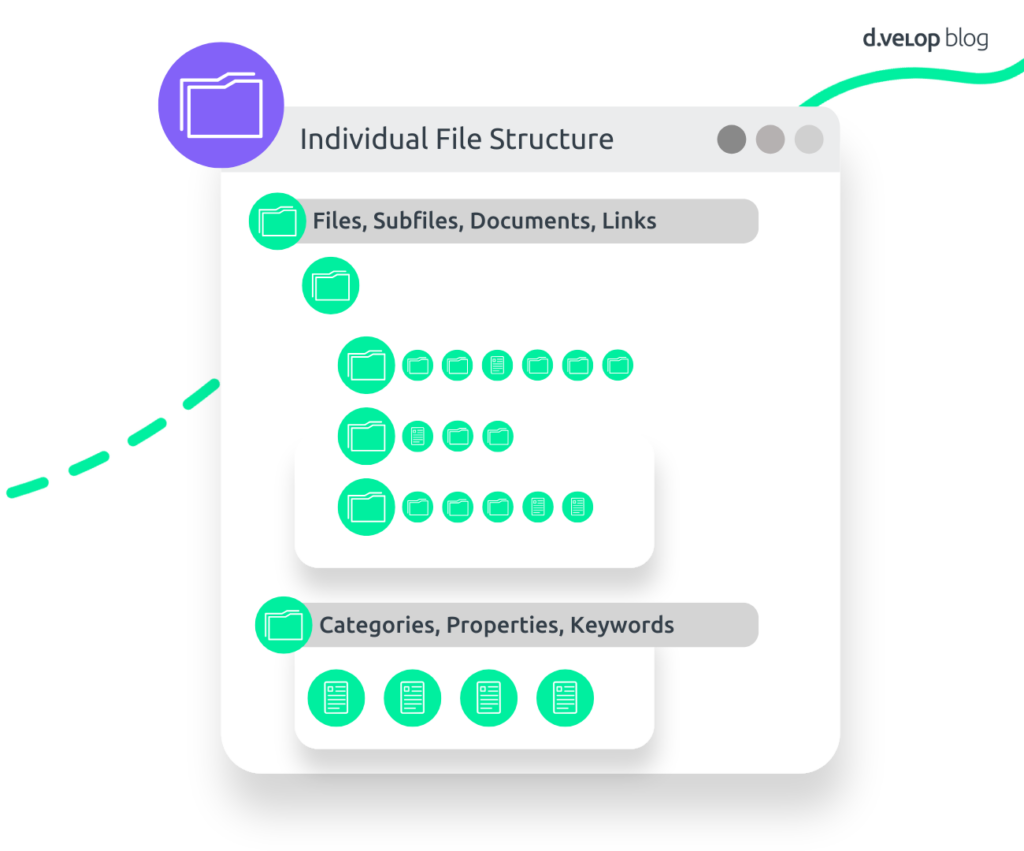
A file structure describes the case-related organisation of documents and information within a document management system (DMS). It reflects the actual structure in the form of links and properties through which digital files and their contents are organised, for example by business transactions.
In contrast to the file plan, which represents an overarching subject-based classification system (such as thematic areas like “Personnel”, “Finance” or “Contracts”), the file structure shows how individual cases or processes are stored and linked in practice — for example, a purchase order, an order confirmation and an invoice linked to both a procurement file and additionally a customer file.
The file structure therefore represents the hierarchical setup of the digital filing system by linking files and documents. A file in the digital archive is a unit consisting of elements and descriptive properties. These elements may include documents as well as other files. For instance, a customer file may be linked to a subordinate order file, which contains the documents related to specific orders.
To ensure documents can be found not only by document type or individual properties, they can be linked within files. This creates a hierarchical connection between a file and its documents. In this way, existing organisational structures can be reproduced, helping users find their way around quickly. For example, an invoice may be stored together with the purchase order, the order confirmation and other related documents in a procurement file, and at the same time in a customer or supplier file.
💻 Project guide: Successful Introduction of Digital Dossiers in 3 Phases
Creating a Digital File Structure – Using a Supplier File as an Example
To understand what a digital file structure looks like and which elements it needs to contain, it helps to look at a concrete example. In this case, Siegfried Lose from the company Lose Schraubenwerke GmbH wants to introduce a digital supplier file as the first step.
Which Requirements Must a Digital File Structure Meet?
The file structure must meet the following requirements:
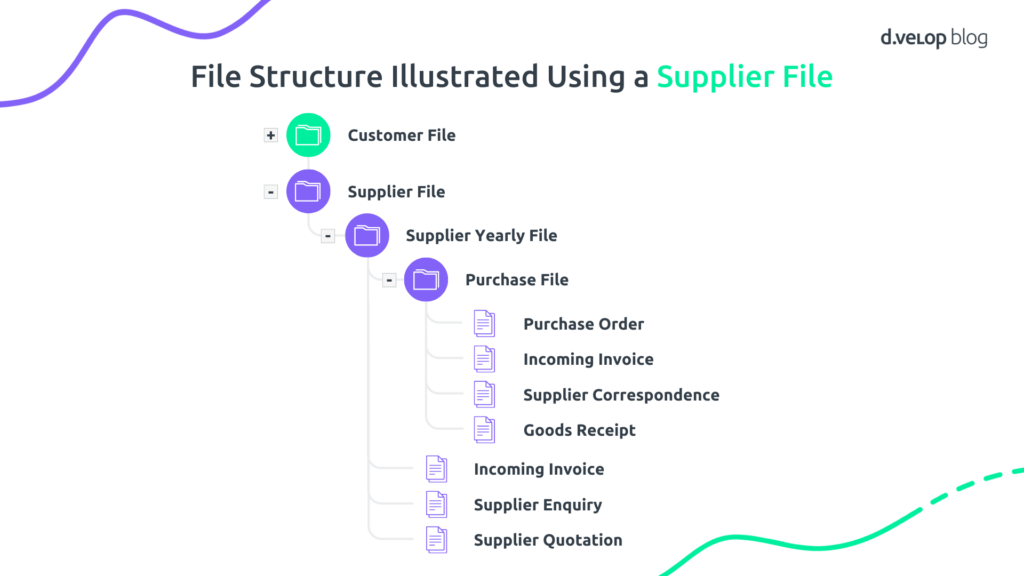
For Mr Lose, it is essential that outgoing purchase orders and the associated incoming invoices, delivery notes and correspondence are stored together in a single purchase file. In addition, all purchase files related to a supplier should be stored within a shared supplier file, ideally organised by year.
With this file structure, a document can be linked automatically to the supplier file, the supplier yearly file and the purchase file when archived, based on the properties “supplier number”, “supplier”, “street”, “postcode”, “city” and “country”.
How Is a Digital File Structure Organised?
The file structure provides a separate file for each supplier. Within this structure, individual purchase orders and other related documents are stored in separate purchase files. Annual structuring takes place using an intermediate supplier yearly file.
An example of such a file structure for a supplier file is shown below:
In Detail: What the Data Structure of a Purchase File Looks Like
When a purchase order is imported, a purchase file is created in which the supplier name and order date are stored. The purchase file is linked to both the supplier yearly file and the supplier file. If no supplier file exists yet, it is created automatically. The supplier file contains the supplier name, address and supplier number. This information is retrieved from a database table based on the supplier name. The order confirmation includes the supplier name and the date. The following properties are therefore required:
- Supplier: alphanumeric value, 35 characters
- Street: alphanumeric value, 35 characters
- Postcode, City, Country: alphanumeric value, 35 characters
- Supplier number: alphanumeric value, 35 characters
- Date: date value
Inheritance flows from lower to higher levels. This means that when a document is stored in the purchase file, it can also be found via the supplier yearly file or the supplier file, as these are linked to one another.
Conclusion: Creating a File Plan Is Not Difficult – What Matters Is Continuous Improvement
Whether analogue or digital, a file plan is a key element of efficient document archiving. It ensures structured, consistent and transparent records management. At the same time, a file plan is not a rigid construct. It can be adapted and improved at any time. In many cases, optimisation opportunities only become visible in day-to-day work and should be actively used.
An opportunity in digital transformation: As in many areas of digitalisation, file plans also offer potential for the use of artificial intelligence. One possible application could be simplifying and supporting the creation of file plans through AI-driven approaches.
Software Demo for Digital Files 💻
Book your personalised software demo of the d.velop document management system in just a few clicks. Experience digital files live within a document management system and ask your questions directly to our experts.
Frequently Asked Questions About File Plans
A file plan (also known as a process map, records schedule, registry plan, archive plan, structure plan, folder plan or file plan) is a tool used to systematically organise and continuously manage all records within an organisation, including files, data and documents. It provides a content-based structure that helps users create new files and find existing ones. A file plan also ensures coherence across hybrid records that may exist partly in paper-based form and partly as digital files or database entries.
Digital files are the ideal starting point for digital transformation. A file plan is a key tool for the structured and efficient management of documents, making it a crucial foundation for digital processes. It provides the essential framework for storing and retrieving information.
Artificial intelligence may in future play a central role in the automated and intelligent creation of file plans. One possible scenario: instead of defining file structures manually, administrators could simply describe the type of structure required—such as a purchase file with specific categories and properties. The AI could analyse this description and generate a concrete proposal for the file structure.