

At a Glance – Your Key Takeaways
- Process automation software transforms rule-based routine tasks into seamless workflows
- Result: fewer errors, greater transparency, lower costs, and higher employee satisfaction
- Modern stacks (Low/No-Code, integrations, reporting, AI/RPA/IDP → hyperautomation) deliver measurable impact, e.g. −25% time-to-productivity during onboarding.
To stay competitive today, businesses must handle routine tasks digitally and error-free – otherwise, teams waste valuable time and energy. The right process automation software makes this possible: repetitive tasks become automated workflows that run without constant follow-ups. This relieves your employees, reduces error rates, and ensures you always have full visibility of process status. In addition to saving time, you benefit from greater transparency, lower costs, and happier teams.
What is a Process Automation Software?
By definition, process automation refers to the targeted conversion of digital and manually executed processes into automated workflows. A Process automation software maps these workflows, controls them, and ensures tasks are executed automatically, rule-based, and without human intervention. Unlike traditional Business Process Management, the focus here is not on optimising processes but on fully automating them.
Typical use cases include repetitive tasks with clear rules, such as processing incoming invoices or onboarding new employees. The key is that the process is rule-based, repeatable, and works with standardised input. The higher the volume and the more variations the process has, the more worthwhile automation becomes.
Why Invest in a Process Automation Software?
Automating business processes offers numerous benefits backed by clear metrics. The most important include:
- Long-term cost reduction: With the same workforce, larger workloads can be handled in the same time. This lowers administrative costs and improves competitiveness.
- Increased productivity and efficiency: Automated workflows run faster, without interruptions, and around the clock. Employees can focus on value-adding tasks, improving overall performance.
- Higher employee satisfaction: Eliminating monotonous routine tasks makes work more attractive; employees feel more connected to the company.
- Reduced errors and compliance risks: Automated processes are less prone to human error, always work with up-to-date data, and support compliance with data protection and security requirements.
Real-world examples show impressive productivity gains: a fully digital onboarding process at ServiceNow reduced the time to full productivity for new employees by 25%. Such efficiency gains give companies a tangible competitive edge.
Examples of Automatable Processes
Not every business process is equally suitable for automation. Prerequisites include manual, rule-based, and recurring workflows with standardised input and high volume. Typical examples are:
- Invoice processing: automated capture and approval of incoming invoices.
- Employee onboarding: standardised process from contract signing to induction, coordinated automatically.
- Approval workflows: holiday requests, expense claims, and contract reviews can be digitally checked and approved.
- HR processes: payroll, absence management, and reporting can be digitised, enabling HR to work more strategically.
- Support and service processes: chatbots and ticketing systems automate the intake and handling of customer enquiries.
Before automating a workflow, a detailed process analysis is worthwhile. It identifies bottlenecks, defines process KPIs, and lays the foundation for optimisation.
Key Features of Process Automation Software
Modern process automation software is defined by several core functionalities:
Workflow Management
Process automation software provides comprehensive workflow management capabilities to model, monitor, and optimise business processes – often without programming skills. Using graphical interfaces, workflows can be created and adjusted via drag-and-drop. These tools enable the design and management of automated workflows for greater consistency and efficiency.
Integration with Existing Systems
It integrates seamlessly with ERP, CRM, and HR systems, ensuring smooth data exchange between applications without media disruptions. This creates a continuous flow of information.
Data Management and Analytics
Powerful data management and analytics functions are built in to collect, store, and analyse data. These insights help improve process performance and support informed decision-making.
User-Friendliness and Low/No-Code
Users can automate and customise processes themselves via graphical interfaces – even without IT expertise. This boosts adoption and reduces the burden on IT teams.
AI, RPA, and Hyperautomation
The combination of Robotic Process Automation (RPA), Artificial Intelligence, and machine learning leads to hyperautomation. Generative AI supports complex steps such as extracting data from unstructured documents and acts as the “glue” between different automation technologies. Agentic AI is evolving gradually and will increasingly control autonomous processes in the future.
Implementing Process Automation Software: Step by Step
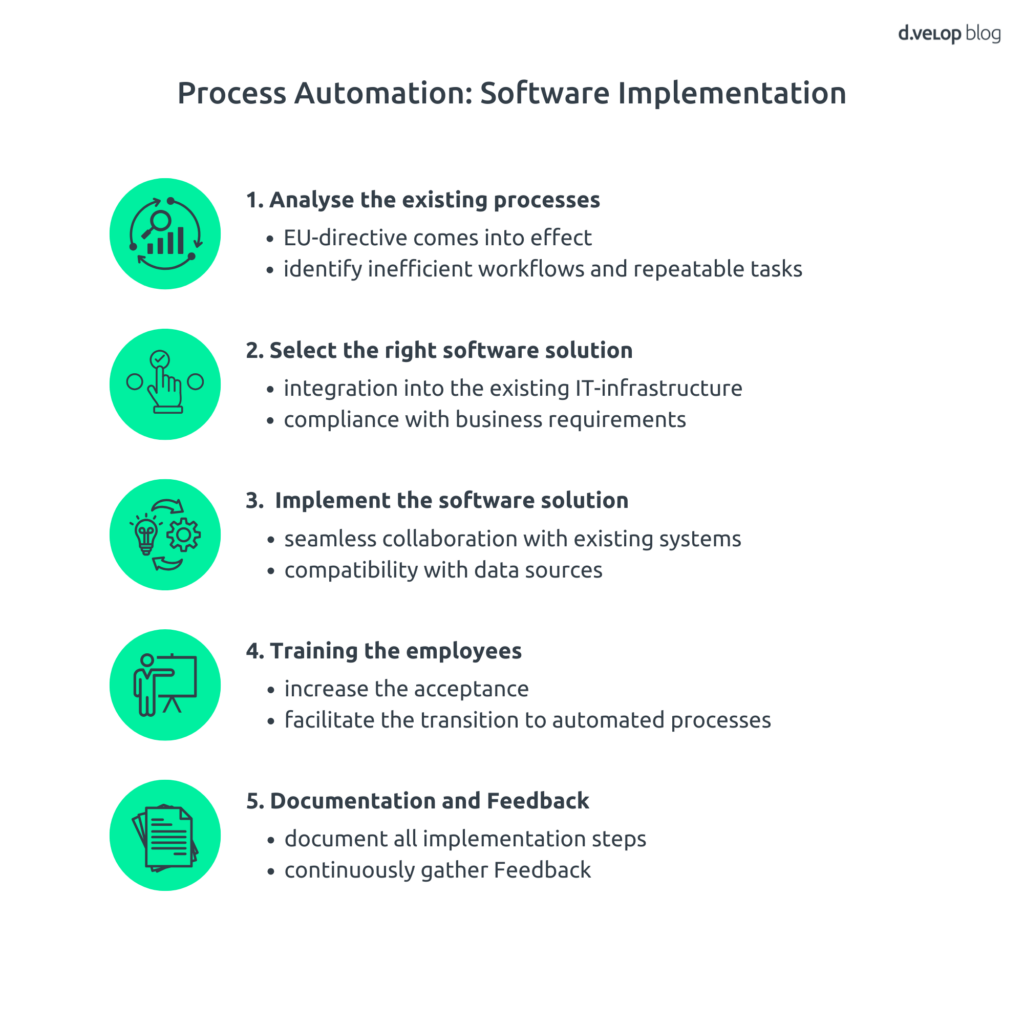
A structured rollout minimises risks and accelerates value creation. Follow these steps:
1. Analyse Existing Processes
Examine current workflows, identify bottlenecks and repetitive tasks. Use process analysis methods to assess automation potential.
2. Select the Right Software
Based on your analysis, choose a solution that integrates well with your IT landscape and meets your requirements. Pay attention to scalability, user-friendliness, and low-code capabilities.
3. Implement the Software Solution
Deploy the selected process automation software within your systems and connect the necessary data sources. External experts can help avoid falling into the “expectation trap.”
4. Training and Change Management
Train employees to use the new workflow tools effectively. Training sessions increase acceptance of the new technology and ease the transition to automated processes.
5. Documentation, Feedback, and Optimisation
Document all steps of implementation and optimisation to ensure sustainable management of process automation. Continuously gather feedback from employees and stakeholders to keep the automation solution effective and continuously improve it.
d.velop process studio: Software for Process Automation
The d.velop process studio is a powerful process management software that helps businesses efficiently automate standard workflows. With a no-/low-code approach, the software enables easy implementation while adhering to the Object Management Group (OMG) standard. It relieves employees by digitising business processes and empowers departments to model their own workflows. Simple integration and connectivity with third-party systems allow cross-system operations, while a robust workflow engine supports process optimisation. The combination of workflows and a document management system ensures optimal process execution and improves overall efficiency within the organisation.
Use Case: Intelligent Document Processing (IDP)
Digital transformation continues to advance across all areas of business, and wherever large volumes of documents need to be processed daily, there is enormous automation potential. One particularly exciting approach is Intelligent Document Processing (IDP).
What does this mean?
With IDP, AI takes over the tedious work that would otherwise consume valuable employee time. Documents – whether invoices, contracts, purchase orders, or forms – are automatically recognised, classified, and the relevant information extracted. In the next step, this data flows directly and seamlessly into downstream processes. This not only saves time and costs but also reduces sources of error and creates significantly leaner workflows.
The best part: Integration with d.velop process studio makes implementing such intelligent workflows remarkably simple. Without complex IT projects, companies can smartly automate their document processes and lay the foundation for more efficient workflows.
Conclusion: Shaping the Future with a Process Automation Software
Process automation software is no longer a “nice-to-have” – it’s a critical lever for efficiency, quality, and competitiveness. It replaces monotonous, error-prone tasks with digital workflows, creates transparency, and enables sustainable cost reduction. Modern solutions combine workflow management, integration, data analytics, and AI – forming the foundation for hyperautomation and agent-driven processes. With a clear strategy, skilled employees, and the right tools such as d.velop process studio, companies can future-proof their processes.